
The ‘Service Vehicle Soon’ light is a common feature across various vehicles, signaling the need for maintenance. For local private car owners, used car buyers, and fleet operators, understanding how to reset this light is crucial for maintaining vehicle performance and compliance with service schedules. This guide will outline several methods to turn off the service vehicle soon light, including manual resets, button combinations, the ignition cycle method, and the use of diagnostic tools. Each chapter will build upon these methods to provide a well-rounded understanding, ensuring that you can confidently manage your vehicle’s maintenance needs.
From Reminder to Reset: A Brand-Agnostic Guide to Clearing the Service Vehicle Soon Light

The Service Vehicle Soon light is not a warning that something is about to break; it is a maintenance reminder. It signals that routine service—often an oil change, filter check, or inspection—has triggered a reset cycle in the vehicle’s conditioning software. After a legitimate service, the light should be cleared so the system can accurately remind you when maintenance is actually due next. When you approach this task, the goal is not to erase a fault but to reset a scheduled maintenance interval in a way that is faithful to the vehicle’s design. The challenge for drivers is that there is no single universal button sequence that works on every make and model. The number of steps and the exact button or menu names will vary, but the underlying principle remains the same: you must trigger a reset after the maintenance has been completed, using the method prescribed by the vehicle’s architecture. In many vehicles, the reset is intentional and deliberate, a small calibration of the dashboard’s eye to the car’s ongoing needs. In others, a reset is a software lean-to that clears an oil-life counter or similar indicator. The practical consequence is clear: if you attempt to bypass the maintenance reminder without completing the service, you risk missing important maintenance windows. A reliable reset is a sign that the system has recognized a fresh interval, not a trick that hides a pending oil change or inspection. For readers who want to dive deeper or cross-check steps, a broader overview is available on the KMZ Vehicle Center blog and can be a helpful companion as you navigate the specifics of your own vehicle.
When you set out to clear the light, the path you take should feel straightforward and methodical. A common starting point is a manual reset via the dashboard controls. Many vehicles use a dedicated trip or odometer button, often located near the steering wheel or on the instrument cluster. The generic process goes like this: ensure the ignition is off, then press and hold the trip or odometer button. With the button still pressed, switch the ignition to the ON position without starting the engine. Keep holding the button until the display cycles to a maintenance term such as “ODO” or simply indicates “SERVICE.” Release the button briefly, then press it again to confirm. If the reset is supported in this configuration, the indicator light will flash or momentarily blink and then disappear. While the exact labels may differ from one vehicle to the next, this approach captures the idea: a button-driven reset that is activated while the vehicle’s power is supplied, followed by a confirmation delay. The rhythm can be quick, and many drivers find that the light goes away within a few seconds. It is a tidy, self-contained method that works well on models that use a straightforward counter for service intervals.
On many modern dashboards, another route to a clean slate lies in the dash itself via a different button combination or menu navigation. In these vehicles, the reset is often tied to a central set of maintenance or vehicle settings, accessible through the on-board computer. The steps resemble this pattern: turn off the engine, then locate the appropriate control—often labeled SET or INFO on the steering wheel or dash. With the ignition switched to ON, release the button and perform a secondary press to trigger the reset. The display should reflect the transition, signaling that the maintenance interval has been cleared. The exact wording on the screen might be “Reset,” “Oil Life 100%,” or a message confirming maintenance has been acknowledged. The principle is identical: you are instructing the vehicle’s system to restart its counting from a full value, signaling that the vehicle is fresh from service. This approach is well suited to vehicles that rely on an information screen rather than a simple numeric oil-life indicator.
A separate path exists for models that lean on a more abrupt, hardware-based reset. In some cases, the reset is linked to a specific ignition cycle or sequence that is easier to perform on older or more mechanically conservative designs. The generic description is as follows: turn the engine off, then switch the ignition to ON and apply a deliberate, time-bound action that signals “reset.” Examples can include holding a button while pressing the accelerator or brake pedals, or performing an extended press on a dedicated reset switch. The essence is that the reset is not a casual tap, but a deliberate instruction to the vehicle’s software to clear or reinitialize the service interval. It is important to note that this method may not be available on every model, and it may interact with other vehicle systems, sometimes resetting radio presets or trip data. If this route is chosen, it should be done only after you are certain the maintenance has been completed, to avoid inadvertently erasing necessary data.
For newer and more digitally integrated vehicles, a diagnostic tool has become the most reliable path to a definitive reset. An OBD-II scanner, paired with vendor-specific software, can access the vehicle’s maintenance data directly and issue a proper reset command to the powertrain control module or the service interval controller. This method is especially helpful for vehicles whose dashboards show oil life or maintenance reminders through a more complex electronic architecture. The steps are straightforward but technical: connect the scanner to the vehicle’s OBD-II port, power the device, and follow the software prompts to locate the maintenance or oil-life function and confirm the reset. The advantage of this approach is its compatibility with modern systems that may not respond to manual button presses or single-screen resets. It also preserves other settings and avoids unintended side effects that can accompany battery disconnections.
To anchor these ideas in a practical frame, consider that a reset should occur only after the servicing is truly complete. The oil has been changed, filters inspected, fluids topped, and the service performed to the required standard. Resetting before that work is done risks a maintenance gap, which can lead to longer-term wear and missed intervals. If the light persists after the prescribed steps, the system may be indicating a genuine fault rather than a reminder. In that case, it is wise to consult the vehicle’s owner’s manual, or contact a qualified technician who can diagnose and, if needed, clear any fault codes that may be present. It is also a good habit to verify that no other warning lights accompany the service indicator, as multiple alerts can complicate the interpretation of the dashboard.
For readers seeking practical guidance and additional context, you can explore a broader discussion and user experiences on the KMZ Vehicle Center blog. The site often contains model-agnostic tips and highlights common pitfalls that drivers encounter when attempting resets, especially on vehicles with mixed analog and digital interfaces. Reading those insights can help you prepare for the exact path your own car uses, making the reset process faster and less stressful. KMZ Vehicle Center blog.
In closing, the diverse landscape of reset procedures underscores a simple truth: there is no universal magic key that clears the Service Vehicle Soon light across all makes and years. The right path depends on the vehicle’s architecture, its age, and whether the system relies on a straightforward counter, a digital oil-life percentage, or a diagnostic interface. When in doubt, start with the most accessible option—your vehicle’s own maintenance or settings menu—and progress to a connected diagnostic tool if needed. Always ensure that maintenance has been completed before clearing the indicator, and never treat the light as a mere nuisance to be dismissed. If you share the exact make, model, and year, a precise, step-by-step guide tailored to your car can be provided to remove any ambiguity and help you move smoothly from reminder to reset.
External reference: for a manufacturer’s authoritative maintenance reset procedure, consult the official maintenance guide at the source that aligns with your vehicle’s brand and model. This resource offers structured, model-specific instructions and is a reliable companion to the steps outlined here.
External reference resource (for further reading): https://www.toyota.com/owners/manuals
Quieting the Wake-Up Call: A Practical Guide to Resetting the Service Vehicle Soon Light

The Service Vehicle Soon light—often called a maintenance reminder or service indicator—is not a diagnostic signal. It’s a notification that a scheduled service window has passed or a reminder that a routine maintenance task, such as an oil change or inspection, should be completed. When the service is performed, most cars require a reset of that reminder so the clock on the car’s maintenance schedule starts anew. Resetting is not the same as repairing a fault. If the light remains after you’ve completed a service, it may indicate the vehicle still needs attention, or there may be a fault that requires diagnosis. The reset procedures vary by make and model, and even within a given brand they can differ across years or trim levels. The key is to approach the process with care, using the method that matches your vehicle’s control layout and ignition sequence, because a wrong reset can leave you with a reminder that won’t clear or, worse, a reset that doesn’t actually register with the vehicle’s computer. For drivers who like to understand what’s happening behind the scenes, the maintenance reminder is a way for the vehicle to track service intervals, while the reset is a calibration that tells the car’s brain to begin counting again after maintenance is complete. The practical takeaway is simple: once the service is done, you reset the indicator so your maintenance schedule stays accurate, and you can rely on it to alert you when the next interval is due. If you’re curious about broader maintenance timing, you can consult the KMZ Vehicle Center blog, which compiles approachable guidance on how to balance time and mileage when planning service—this can help you plan future visits and avoid lapses that might trigger the reminder in the first place. KMZ Vehicle Center blog.
In most cars, the reset can be accomplished through a few straightforward steps that use the instrument cluster buttons or the ignition sequence. A common approach involves a manual reset via dashboard controls. You typically start with the ignition off, then locate a button such as TRIP or ODO on the steering column or dashboard. With the key in the ON position—meaning the car is powered but not running—you press and hold that button until the display cycles to the odometer or shows a maintenance menu. Release, then press again. The light should blink and then go out. The exact prompts you’ll see—sometimes the word “SERVICE,” sometimes a spooled maintenance message—depend on the model, but the pattern is consistent across many vehicles: ignition off, hold the button, switch to ON, hold through the display transition, and observe the reset sequence. This method is favored for its simplicity and because it doesn’t require extra gear or tools beyond what you already carry in the car’s cabin.
Another route you may encounter uses a different pair of controls—often labeled SET or INFO on the dash—and a specific sequence to release the service reminder. In many cases, you’ll turn the ignition to the ON position with the engine off, press and hold the appropriate button, release, and then press it again after a moment. The information module should respond with a confirmation that the reminder has been cleared. This approach, though slightly different in button labeling, follows the same logic: the vehicle’s computer needs to see a moment of deliberate user action to acknowledge that maintenance has been completed and that the interval should be reset. Modern cars that rely on a centralized infotainment system may instead guide you through a maintenance menu on the touchscreen. In those cases, the reset is embedded in the Settings or Maintenance sections. The result is the same: a refreshed maintenance timer that aligns with the actual service history.
If the dashboard’s button-based reset isn’t available or feels ambiguous, a battery-connector method is sometimes presented as a last resort. This method—disconnecting the negative terminal for a short period and then reconnecting it—interrupts the vehicle’s power and prompts a system reset. It is a more aggressive approach and can affect other settings, such as radio presets or clock data, and it resets other nonessential parameters across various subsystems. Because of this, it should be used only when no button-based reset is possible and when you’re prepared to reset or re-enter certain personalizations afterward. The essence of this option is to remove all power from the vehicle for a brief window, allowing the memory modules to reboot and the maintenance timer to reboot with a fresh count once power is restored. It’s a blunt instrument compared to the more nuanced button method, so it should be reserved for cases where the conventional resets fail or are not documented for a specific model.
A growing number of newer vehicles rely on diagnostic tools to reset the service reminder. An OBD-II scan tool or a compatible diagnostic adapter can interface with the vehicle’s onboard computer to reset maintenance intervals. This approach is often the most reliable, especially on late-model cars with integrated maintenance histories and more complex control modules. Using a tool may involve connecting to the OBD-II port under the dash, selecting a maintenance or service interval reset option in the tool’s software, and following the on-screen prompts to clear the reminder. Tools range from consumer-friendly devices with guided interfaces to professional-grade scanners that provide deeper access to service-related parameters. For drivers who prefer not to risk ambiguity with button sequences, a diagnostic tool offers a clear, auditable reset that is recognized by the vehicle’s computer and often by service records. When adopting this route, you’ll find resources and step-by-step prompts designed to minimize guesswork, making it easier to confirm that the reset has taken effect.
No matter which method you choose, the crucial step is verification. After performing a reset, you should turn the ignition off and then back on, ensuring the engine remains off during the process if required by the method. Watch the instrument cluster for the absence of the “Service” or “Maintenance Required” indicator. If the light clears, you’ve completed the reset. If it remains, there is a real possibility that a maintenance task is still outstanding—perhaps a service interval, a sensor alert, or a fault that wasn’t resolved during service. In that case, recheck your records, confirm that the service was completed, and consider re-entering the reset procedure in case the sequence wasn’t captured correctly the first time. If in doubt, consult the owner’s manual for your exact model and year, because the precise steps can shift with minor hardware updates and software revisions.
The practical reality is that some drivers encounter a stubborn reminder that won’t clear. When this happens, it’s not a sign of a malfunction in the light itself; it’s an indication that a deeper maintenance task remains outstanding or that a fault code has not been fully cleared. In such situations, the best course is to return to the service provider who performed the maintenance or to a qualified technician who can read the vehicle’s fault codes with an appropriate tool. A professional diagnostic can reveal hidden service requirements, such as a filter replacement that isn’t tagged in the front panel, or a calibration that must be reprogrammed in the body control module. The goal is not merely to silence the light but to ensure the vehicle’s maintenance history matches its current state of health.
In addition to brand-specific instructions, manufacturers commonly publish official guidance that reflects the intended method for each model year. While these manuals vary by brand, the underlying principle remains consistent: you reset after service to re-synchronize the maintenance schedule with actual work performed. It’s wise to consult the official manual for your exact vehicle rather than relying solely on third-party summaries. The official resources provide the most precise steps and any model-year distinctions. If you need a starting point for locating the correct instructions, the general principle is to seek a reset option tied to the maintenance interval, often labeled with terms like SERVICE, MAINTENANCE, or the reminder icon. A reliable, community-accepted approach is to review the model’s official manual or the brand’s support pages for a step-by-step procedure tailored to your car’s configuration.
For readers seeking a broader context on maintenance cycles and practical maintenance planning, the KMZ Vehicle Center blog offers accessible guidance that can help you anticipate when a service should be due and how to prepare for it, making resets a natural part of a well-managed maintenance routine. KMZ Vehicle Center blog.
If you want reassurance from a broader automotive reference, the Car and Driver maintenance guides offer a comprehensive, consumer-oriented view of how service reminders function across a range of vehicles and how modern systems integrate with service records. This resource can help you understand not only how to reset the light but also how to interpret the maintenance indicators you’ll see on the road. For more on reliable maintenance practices and how these indicators fit into a modern vehicle’s lifecycle, see Car and Driver’s broader maintenance coverage: https://www.caranddriver.com/.
The Quiet Reset: Mastering the Ignition-Cycle Method to Turn Off the Service Vehicle Soon Light

When a maintenance reminder lights up on your dashboard, it’s easy to treat it as a personal to-do list you must complete before you can move on. The Service Vehicle Soon indicator is not a fault code or a warning that something is catastrophically wrong; it is a compact prompt, a calendar reminder stitched into your car’s maintenance schedule. The ignition-cycle method described here is a practical, low-tech way to clear that reminder after you’ve completed the required service, especially when the model you drive belongs to a family of vehicles that favors this very ritual. But like all reminders, it’s only a reflection of what’s in the service log. Clearing the light does not fix an actual malfunction, and if the light persists after a reset, you should treat it as a sign to pause and diagnose more deeply. The approach is simple in its steps, yet it hinges on a precise sequence that many drivers have found reliable across a range of makes and years. It is a method that blends familiarity with the dashboard’s tactile language—the subtle click of a button, the momentary breath of the engine as the ignition cycles, and the quiet patience of waiting those precious seconds before you resume the drive.
To embark on this reset, you’ll first acknowledge where you are in the car’s cycle of care. Maintenance reminders are part of the vehicle’s memory, recording service events such as an oil change or an inspection. After the work is done, the reminder needs to be told, in a sense, that the job is complete. The ignition-cycle method achieves this by cycling power in a careful, repeatable rhythm. It is particularly common in a range of vehicles that rely on the trip odometer reset control as part of the reset protocol. The steps you’ll follow are not a generic “press a button and you’re done”; they are a small routine that engages the instrument cluster’s memory back to a fresh state, ready to start a new maintenance countdown. While the exact button labeling may differ from one model to another, a familiar silhouette often appears—the reset or trip button, sometimes labeled with imagery like a small circle or the letters “TRIP” or “000.” The key is not the exact label but the consistent action: press, hold, and cycle the ignition in a prescribed order.
Begin by ensuring the vehicle is completely powered down. This means turning off the ignition and removing your foot from the brake, if applicable, so all systems settle. You will then locate the trip odometer reset button. This control is typically found on the instrument panel near the steering column or along the lower dash. It can be recessed slightly or intended to be pressed with a fingertip, a small button that invites a deliberate press rather than a casual poke. If you’ve never used it before, take a moment to familiarize yourself with its position before you perform the reset sequence. The goal is to press and hold this button while you perform a particular ignition action. This is not a test of dexterity but a test of timing and calm focus. The hold duration is a specific window, commonly around ten seconds, during which the instrument panel is receptive to the reset sequence and capable of translating your action into a cleared reminder.
With the ignition in the correct state, proceed to the core of the ritual. Press and hold the reset button, then turn the key to the ON position—the position that powers the vehicle’s electronics but does not engage the starter motor. You will hold the button throughout this moment. The sequence is deliberate: keep pressing and holding for roughly ten seconds. This pause is not arbitrary; it gives the system time to acknowledge the command and to depart from the last maintenance event. After those ten seconds, release the button and return the key to the OFF position. The vehicle’s electronics will settle, and you will wait. A crucial step follows: wait at least thirty seconds before attempting to restart. This short interval allows the memory and the instrument cluster to synchronize with the new state that you have requested, a state in which the maintenance reminder has no immediate obligation to reappear.
Now, with the waiting period complete, start the engine as you normally would. Observe the dash as the system completes its boot sequence. In many cases, the Service Vehicle Soon light should vanish, replaced by a clean, dark instrument panel or a steady absence of the reminder. If the light persists after this ignition-cycle reset, treat it as a signal rather than a failure of the method. There could be a genuine service requirement—an uncompleted maintenance task, an oil life remaining, or another scheduled check—that needs attention. The reset is a cosmetic and logistical clearing of a reminder, not a diagnosis of a fault. If the light glows again after a reasonable drive, a visit to the manual or a professional diagnostic may be warranted. In some cars the sequence may differ slightly, but the essence remains: the reset relies on a controlled power cycle combined with a memory-clearing action on the instrument cluster. If you own a vehicle that occasionally behaves differently, consult the owner’s manual for the exact steps; many automakers publish model-specific nuances that can save time and avoid misinterpretation.
This ignition-cycle method is a practical tool across a variety of models, especially for vehicles that use the trip meter reset function as a trigger in the service-light routine. The logic behind it is straightforward. The reminder system is designed to count down from the last maintenance event, noting when the next service is due according to mileage, time, or a combination of both. When the service has been performed, you want to tell the system, in effect, that the countdown can restart. The ignition-cycle method accomplishes that by reinitializing the display logic through a carefully timed sequence of power state changes and user input. It is a ritual that emphasizes discipline and an understanding of the vehicle’s internal clock rather than brute force. For drivers who prefer a practice that doesn’t require a tool, this is a reliable, tool-free option that aligns with the car’s own diagnostic language.
If you find yourself curious about how maintenance timing intersects with reminders like this, you might explore the broader conversation around maintenance scheduling. There are resources that discuss optimal oil-change intervals and how time versus mileage can influence when a reminder appears. For readers interested in that broader topic, see the article on Optimal Oil Change Intervals—Time vs. Mileage. Optimal Oil Change Intervals—Time vs. Mileage.
In the end, the ignition-cycle reset is a quiet, almost ceremonial practice. It respects the fact that the service light is a bookkeeping device rather than an alarm signaling imminent danger. It rewards careful maintenance with a clear dash and a sense of control over the vehicle’s upkeep. As with any maintenance procedure, the most reliable approach is to pair the reset with actual service records and a brief inspection to confirm everything that was supposed to be done was completed correctly. If the light returns soon after a reset, or if you notice any unusual behavior—strange noises, warning lights that illuminate alongside the service light, or changes in performance—do not hesitate to consult a professional technician. The reset is a reset; the maintenance needs remain real until confirmed otherwise by a technician.
External reference for further verification and model-agnostic context: https://www.pcauto.com.cn/zhishi/12345678.html
Reading the Quiet Signals: How an OBD-II Diagnostic Tool Clears the Service Vehicle Soon Light with Precision
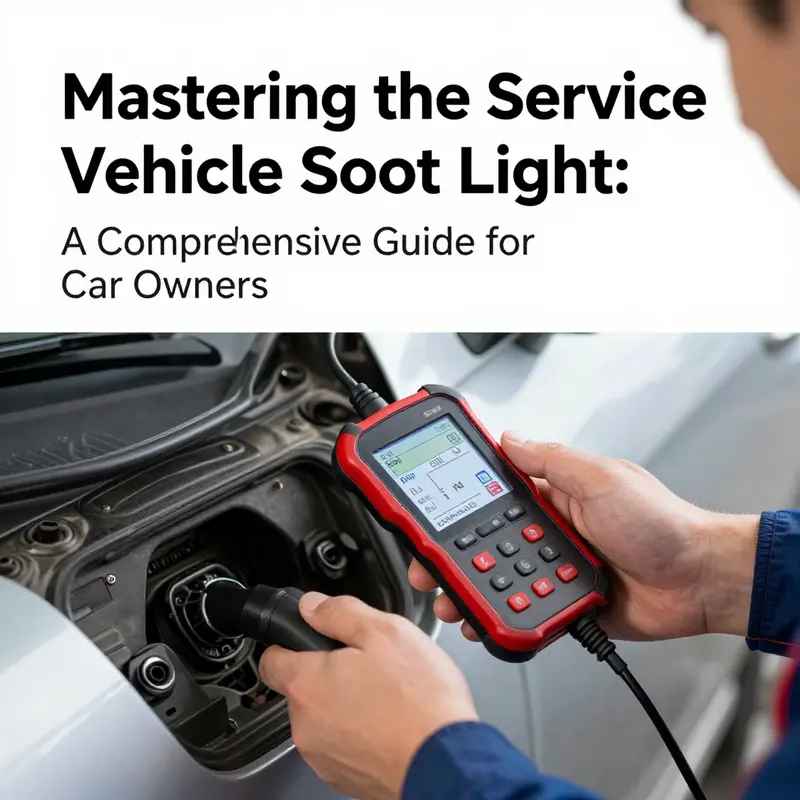
When the Service Vehicle Soon light flickers on, it often carries a story inside the vehicle’s computer, a message more nuanced than a simple to-do item. This light can indicate anything from a sensor drift to a fault that requires corrective action, or it can be a maintenance reminder that has not yet been reset after a service. The diagnostic tool method treats that signal not as a blunt badge of doom to be cleared at random, but as a disciplined sequence: read, interpret, repair, and verify. This approach rests on the core truth that the ECU, or engine control unit, stores fault codes that point to the system or sensor involved. The light’s appearance is a nudge to investigate, and the tool provides a reliable map through which that investigation can begin and, when completed, allow the vehicle to re-run its own self-checks without leaving the door ajar to further faults.
The central premise is straightforward. A compatible OBD-II scanner is connected to the car’s diagnostic port, usually found beneath the dash on the driver’s side. With the ignition in the ON position—engine off—the tool reads stored fault codes that represent detected conditions. These codes, often written in the familiar P, B, C, or U series, locate the fault within the vehicle’s subsystems: powertrain, body, chassis, or network. A common example is a code like P0135, which signals an issue with the oxygen sensor heater circuit. The precise meaning of such a code, and the exact location of the affected component, depends on the vehicle’s make and model, but the principle remains universal: the code narrows the field so you can target repairs rather than guess at random.
Once the codes are retrieved, the next phase is addressing the underlying issue. This step is where the method earns its credibility. A faulty sensor may need replacement or cleaning; a vacuum leak or intake system crack might require sealing or gasket work. Sometimes, the fix is as simple as ensuring electrical connections are clean and snug, or replacing a corroded ground strap. Other times, more involved repairs are necessary—such as repairing wiring harness cuts or replacing a failing coolant temperature sensor. The diagnostic tool guides you to the affected area, but it cannot replace the logic of real-world diagnosis. A misread can lead to unnecessary parts replacement, so the repair must be guided by fault patterns, symptoms, and, when needed, corroborating live data from the scanner while the engine is running. In this sense, the tool supports a clinician’s approach to vehicle maintenance, where a reasoned hypothesis is tested against facts the ECU has collected.
After the repair is completed and the fault has been addressed, the procedure shifts to clearing the stored codes and allowing the ECU to recheck the system on its own. Clearing is not a wholesale erase of data so much as a way to reset the memory of the ECU. If the root cause is resolved, the self-diagnostics should pass during the next drive, and the Service Vehicle Soon light will remain off. If, however, the underlying fault persists or a related subsystem remains out of spec, the light can return, sometimes almost immediately, and the pattern of codes may reappear in the memory. This is a critical distinction: clearing codes without repair is a short-term fix that fails the test of reliability, because the engine’s brain will re-diagnose the same problem and re-light the warning.
The sequence—read, repair, clear, verify—also emphasizes a practical truth about modern vehicles: many faults are intermittent or conditional. A sensor might fault only when the engine is at a particular temperature, or a circuit may degrade gradually as an oxidation layer forms on a connector. In such cases, the diagnostic tool’s readings carry more weight when paired with direct observation of engine behavior. If the light persists after a clear, it often signals that the fault has not been fully corrected or that a second issue exists alongside the first. In that moment, a careful re-check becomes necessary: re-check the fault codes, inspect the likely areas, and consider whether the vehicle’s operating conditions (temperature, load, speed) were replicated during testing. A thorough approach avoids the trap of assuming a single-fault scenario where there are multiple contributing factors.
A thoughtful diagnostic session also requires an awareness of the subtle boundaries between maintenance reminders and genuine faults. The Service Vehicle Soon light can be triggered by routine maintenance events that the vehicle’s clock or mileage counter flags as due. In those cases, a reset is appropriate after the service is completed. The diagnostic tool approach, however, remains equally relevant because it ensures there isn’t an overlooked fault lurking behind the reminder. This is where the broader perspective of maintenance becomes valuable. Maintenance activities such as oil changes or filter replacements interact with the vehicle’s systems in ways that can temporarily alter sensor readings or ECU diagnostics. The tool helps confirm that those maintenance actions have not introduced a new fault and that all monitors are healthy before you resume normal operation.
The practical value of this method becomes even more apparent when you consider the varied landscape of vehicle design. Not every car uses the same sequence to reset the light, and not all failures are obvious to the naked eye. Some models require a specific sequence of button presses or a particular pattern of ignition cycles to enable the tool’s clear function. Others rely on the ECU’s self-diagnostic routines to re-evaluate the system after a drive, meaning the operator must give the car a bit of time and road conditions to confirm stability. In all cases, the diagnostic tool acts as the translator between human intuition and machine logic. It translates the codes into actionable steps and then translates the repair outcomes back into an object that the car understands: a clean slate and a verified readiness to operate.
As you work through this process, it helps to keep a steady mindset. Begin with the simplest, least invasive checks. Confirm that there are no obvious loose wires or corroded connectors that can be addressed quickly. A loose sensor plug or a cracked vacuum hose can generate a fault code that seems more dramatic than the underlying issue, and correcting those basics can often extinguish the light without the need for parts replacement. If the fault persists after the simplest steps, delve into more specific components. The oxygen sensors, mass airflow sensor, and coolant temperature sensor are frequent culprits because they influence the engine’s air-fuel balance and thermal management. Cleaning, re-timing, or replacement in these areas, guided by the codes and live data, tends to produce reliable results when executed with care.
For readers who want to extend their maintenance literacy, this topic naturally connects with broader vehicle-care practices. To explore practical, hands-on guidance on ongoing upkeep and how to approach maintenance with confidence, you can read about Truck maintenance tips for first-time owners. That resource complements the diagnostic approach by reinforcing how consistent maintenance reduces the chance of unexpected faults and keeps the diagnostic process focused and efficient. Truck maintenance tips for first-time owners.
Ultimately, the diagnostic tool method for turning off the Service Vehicle Soon light rests on a simple, repeatable discipline. Read the codes with the ignition on but the engine off to avoid misleading live data. Interpret the codes with a healthy skepticism about symptom-to-code mapping, then address the root cause with targeted repairs. Clear the codes only after the repair is complete, and verify the outcome with a test drive to ensure the ECU re-runs its self-diagnostics cleanly. This approach does not merely silence a warning—it confirms that the vehicle’s systems are behaving within specification and that the road ahead is free from the shadow of unresolved faults. For support beyond the basics, consult official diagnostic guidance and the vehicle’s manual, and when in doubt, seek a trained technician who can corroborate the readings and verify the repair in person.
External reference for in-depth, professional verification and best-practice standards can be found through the National Institute for Automotive Service Excellence (ASE): https://www.ase.com
Reading and Resetting the Service Vehicle Soon Light: A Practical Guide to Safely Clearing Maintenance Reminders
The moment you notice the Service Vehicle Soon light illuminate on your dash, a small but important signal arrives: your vehicle is telling you that routine maintenance is due or that a check is required somewhere in the engine or emissions system. This light is not a driver’s distraction to be ignored, nor is it a signal that your vehicle is about to fail. It is a warning that a scheduled service has not yet been completed or that a fault was detected by the onboard computer. When you take your car in for service, the technician resets the reminder to reflect a fresh maintenance interval. If you are resetting it yourself, the goal is the same: restore a clean slate in the car’s memory so the reminder accurately represents the next due date or mileage. The reset, however, is not a fix for a malfunction. It is a memory update. If the underlying issue persists, clearing the light won’t cure it, and in some cases the light may return or prevent certain operations until the fault is addressed. Understanding this distinction helps you approach the task with both confidence and caution, knowing when a reset is appropriate and when professional diagnosis is necessary.
The practical question then becomes how to perform the reset, and the answer is not universal. Vehicle manufacturers differ in how they allow the service interval to be cleared, and a method that works on one model can fail on another. Some cars use a simple button sequence on the instrument cluster, others rely on a combination of ignition steps with a dashboard button, some rely on disconnecting power for a brief period, and many newer cars require a diagnostic tool to ensure the reset is completed correctly. The key point across all these approaches is clarity: you should not attempt to reset the light unless the maintenance has actually been performed or you are following the manufacturer’s guidance after a service. If you are unsure whether maintenance has been completed, it is wise to confirm with the servicing facility or consult the owner’s manual before attempting any reset.
In general terms, you can think of the reset process as a small act of memory management. The car’s computer stores a maintenance interval and a record of what services were performed. After you complete a service, you want the system to know that the next interval starts anew. This is why the reset is sometimes described as clearing or reprogramming the maintenance reminder. The exact steps you take depend on the make and model, and the instructions are often tucked away in the owner’s manual or on the manufacturer’s official support site. If you want a direct starting point that won’t require you to guess, you can look for a model-specific guide within your vehicle’s documentation or use a reputable, brand-aligned online resource. For readers who also manage a broader maintenance plan, there is value in tying reminders to preventive care such as oil changes, brake inspections, and tire rotations. That broader planning helps prevent the drumbeat of reminders from becoming overwhelming and keeps the focus on keeping the vehicle operating safely and efficiently.
For many vehicles, the common reset patterns share a common rhythm: you need the ignition in a specific state, a button must be pressed in a precise way, and you may need to wait for a display change that confirms the reset. In one frequently used approach, you begin with the ignition off, locate a dashboard button—often labeled TRIP or ODO—and press and hold it while you turn the key to the ON position, keeping the engine from starting. The display usually cycles through indicators until it shows a reset sequence such as “ODO” or “SERVICE” and then returns to normal. When you release the button and press it again, the light should blink and finally disappear. This kind of sequence is common on many sedans and compact cars, and it demonstrates the principle of the reset: the vehicle’s memory is updated to reflect a fresh maintenance cycle after the service has been completed.
Another widely used method involves a key and button combination that you execute in a particular order. In several European and Asian models, the process begins with the engine off; you press and hold a “SET” or “INFO” button on the dashboard, then you turn the ignition to the ON position without starting the engine. After a moment, you release the button and press “INFO” again. If done correctly, the service light clears. While the exact wording on the display can vary, the underlying mechanism is similar: the vehicle’s control unit is instructed to reset its maintenance countdown. This approach is particularly resilient for owners who prefer a physical interaction with the dash controls rather than a computer-based reset.
A third path, often described for certain brands and older systems, involves an ignition cycle that is shorter in duration but more mechanically oriented. In these cases, the procedure can require turning the ignition off, disconnecting the negative battery terminal for several minutes, reconnecting it, and then starting the engine to verify that the light has turned off. The rationale behind this method is to force a soft reboot of the vehicle’s electronic systems. It is effective in contexts where there is no button-based reset available. However, there is a trade-off: this approach can reset other settings as well, such as radio presets or saved preferences, depending on how integrated the system was before the battery disconnect. Because of that side effect, this option is typically suggested only when other, less invasive button-based methods fail, and when you are sure you won’t lose other stored settings.
The fourth route, which has become increasingly common in modern vehicles, is the use of a diagnostic tool or an OBD-II reader. This is often the most reliable method for clearing the maintenance reminder in cars that rely on sophisticated onboard computers. With a compatible scanner, you connect the device to the OBD-II port under the dashboard, run the software, and navigate to the maintenance or service interval reset function. The software then guides you through the necessary prompts to complete a legitimate reset. This approach is especially common in models from manufacturers that integrate more tightly with their diagnostic ecosystems and rely on software validation to ensure the reset is legitimate and aligned with recorded service events. It also has the advantage of minimizing unintended resets or glitches that can occur with manual button procedures. When you choose this path, you avoid the risk of misinterpreting a sequence or leaving behind partial signals that could confuse future maintenance reminders.
Across all these methods, a consistent caveat applies: if the light remains on after you’ve attempted a reset, there is a good chance that the underlying issue prompting the reminder has not been resolved. In that case, the warning is doing its job. A persistent light can indicate a fault in the engine, emissions system, or another critical subsystem, and continuing to drive without diagnosis may lead to further damage, reduced efficiency, and higher repair costs down the line. If you are in doubt about whether you’ve truly completed the maintenance, or if the light comes back after a reset, it is wise to schedule a diagnostic check with a qualified technician who can read the stored trouble codes and assess the vehicle’s health. The mechanic will typically use a diagnostic scanner to retrieve the exact code that triggered the warning, offering a clear path to repair or further investigation.
An additional practical note is that you should also monitor how the car behaves while the light is active. A steady SERVICE light usually points to a non-critical issue that still warrants attention, but a flashing or intermittent light can signal a more serious condition, such as a misfire or catalytic converter concern, which demands immediate attention and may require a reduced driving speed and avoidance of high engine loads. Even when the vehicle seems to run normally, the presence of the light can be a symptom of an ongoing problem that could cause more expensive damage if neglected. So while you pursue a reset, keep an eye on performance, exhaust smell, unusual noises, or rough idling, and plan service without delay if anything abnormal appears.
For readers who want a practical touchstone beyond the reset procedure itself, consider tying maintenance reminders to broader maintenance planning. If you are driven by a structured schedule, you can align your reminders with oil changes, air filter replacements, brake inspections, and tire rotations. A coordinated approach helps ensure that the maintenance reminder reflects the actual health of the vehicle rather than a one-off reset that may become a temporary fix rather than a long-term solution. If you are curious about how maintenance timing relates to oil change intervals and the balance between time and mileage, there is a resource that delves into that topic with careful nuance: you can explore a guide titled Optimal Oil Change Intervals: Time vs Mileage for additional context about maintenance planning. For more on this topic, see the article here: https://kmzvehiclecenter.com/optimal-oil-change-intervals-time-vs-mileage/. As you read, remember that the best practice is always to verify maintenance has been performed and to use the official owner’s manual as the primary guide for brand-specific resets.
In closing, the Service Vehicle Soon light is a practical prompt, not a verdict on the car’s overall reliability. A thoughtful reset after maintenance is appropriate, but only when it reflects a completed service or a routine interval update. If the light persists, or if you notice driving symptoms alongside the warning, treat it as a diagnostic signal and consult a qualified technician. The goal is a safe, reliable vehicle with a maintenance history that you can trust. When you follow the correct reset path for your model and keep maintenance up to date, you regain peace of mind and drive with confidence. For readers seeking a deeper understanding of what the light means in different contexts, an external article provides further insights into the meaning of the Service Engine Soon warning and the appropriate actions to take. External resource: What Does Service Engine Soon Mean And What Should I Do? https://www.motortrend.com/cars/under-the-hood/what-does-service-engine-soon-mean-and-what-should-i-do/
Final thoughts
Understanding how to manage your vehicle’s service lights is a vital skill for all car owners, from private individuals to fleet operators. By employing the methods outlined in this guide, you can confidently reset the ‘Service Vehicle Soon’ light, ensuring your vehicle remains in optimal condition. Remember, resetting the light is just a part of maintenance—regular inspections and servicing are crucial for long-term vehicle health. Taking proactive steps not only extends your car’s lifespan but also enhances safety and reliability on the road.